
AI ID
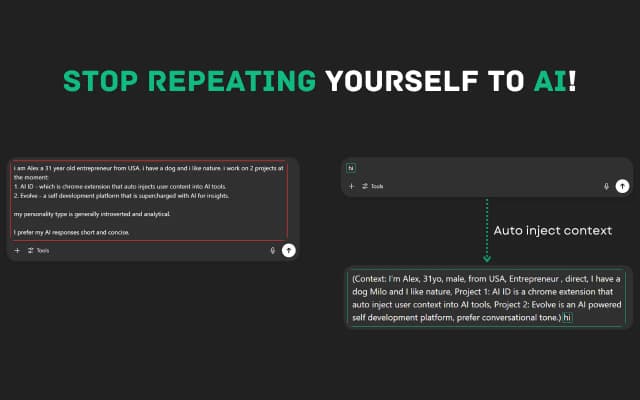
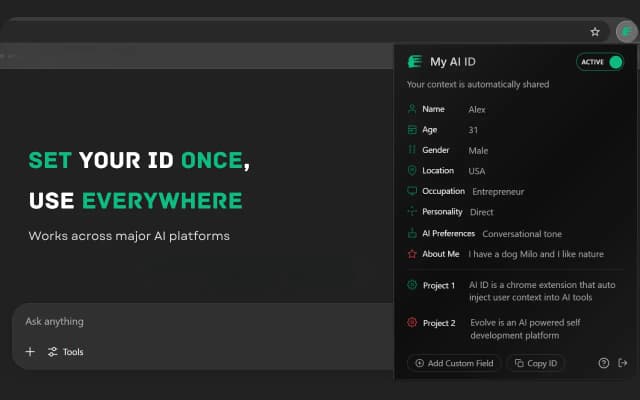
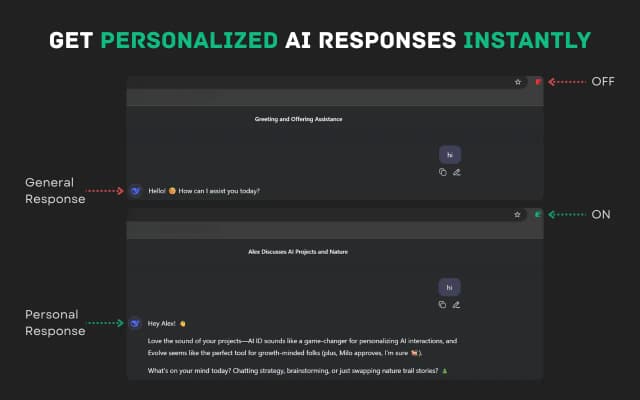
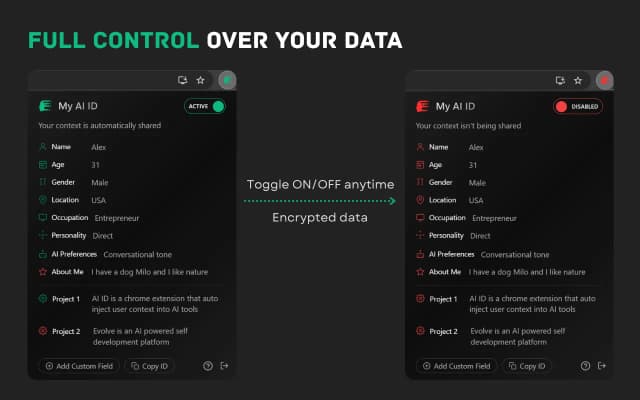
AI ID is a cutting-edge platform designed to seamlessly share your personal context across multiple AI systems including ChatGPT, Claude, Meta AI, Grok, DeepSeek, and more. By automatically integrating your unique data and preferences, AI ID ensures that every AI interaction feels personalized and informed, as if the AI has been working with you for years. This innovative solution eliminates the need to repeatedly provide background information, streamlining workflows and enhancing productivity. AI ID empowers users to maintain consistent context across diverse AI tools, boosting efficiency and enabling smarter, more relevant AI responses. Ideal for professionals and enthusiasts alike, AI ID bridges the gap between human knowledge and AI capabilities, making AI interactions more intuitive and context-aware.
Share your honest experience with AI ID


KeepKit
KeepKit is a powerful Chrome extension designed to supercharge your Google Keep experience by adding a suite of productivity-enhancing features. It allows users to customize their notes with unique backgrounds, attach files seamlessly with Google Drive integration, and export notes in CSV format for easy data management. KeepKit also offers one-click note copying, checklist progress tracking, and smart indentation for lists, making note-taking more organized and efficient. The extension enhances user engagement with rewarding sound effects while maintaining a privacy-focused design, ensuring your data stays secure. With its intuitive interface and practical tools, KeepKit transforms Google Keep into a more versatile and productive workspace, ideal for users looking to optimize their note-taking and task management workflows.

AiPromptAgnt
AiPromptAgnt is a powerful AI prompt management tool designed to streamline and enhance the way users create, organize, and share AI prompts. Available as a free Chrome extension, it empowers prompt engineers and AI enthusiasts to save time and boost productivity by eliminating repetitive typing and enabling fast access to a curated library of prompts. The platform supports multi-platform usage, fostering a community-driven environment where users can collaborate and exchange prompt ideas. With AiPromptAgnt, workflows become smarter and more efficient, helping users achieve better results through optimized prompt engineering. Its intuitive interface and seamless integration make it an essential companion for anyone working with AI-driven text generation, enabling faster workflows and more effective communication with AI models.

Gmail Notifier
Gmail Notifier is a lightweight and efficient browser extension designed to keep users instantly informed about new emails arriving in their Gmail inbox. By running seamlessly in the background, it monitors your Gmail account and provides real-time notifications whenever new messages are received, ensuring you never miss important communications. The extension offers a simple and user-friendly interface, making it easy to stay updated without constantly checking your inbox manually. Ideal for professionals, students, and anyone relying heavily on email, Gmail Notifier enhances productivity by delivering timely alerts directly to your desktop. It supports multiple Gmail accounts and integrates smoothly with popular browsers, providing customizable notification settings to suit individual preferences. With Gmail Notifier, managing your email becomes effortless, helping you stay organized and responsive throughout your day.

DomainIQ.dev
DomainIQ.dev is an AI-powered platform designed specifically for domain investors seeking to maximize the value and profitability of their domain portfolios. It offers advanced domain appraisals using artificial intelligence to provide accurate and real-time valuations, helping investors make informed decisions. The platform also includes comprehensive portfolio tracking tools that allow users to monitor the performance and status of their domain assets efficiently. Additionally, DomainIQ.dev provides premium domain discovery features, enabling investors to find valuable domain names with high investment potential. By combining cutting-edge AI technology with domain market expertise, DomainIQ.dev serves as a command center that streamlines domain investment management, reduces risk, and uncovers new opportunities. This makes it an essential tool for sophisticated investors looking to turn domain names into profitable assets through data-driven insights and automation.

Custos
Custos is an innovative email productivity tool designed to generate personalized email drafts directly from your inbox. By intelligently analyzing the context of your communications and mimicking your unique writing style, Custos helps you craft emails that feel natural and tailored to your relationships. The platform understands the nuances of your interactions and the people you correspond with, enabling it to create relevant, context-aware drafts that save you time and effort. Whether you need to respond quickly or compose thoughtful messages, Custos streamlines the email writing process, making it faster and more efficient without sacrificing personalization. This tool is ideal for professionals who want to enhance their email communication, improve productivity, and maintain a consistent voice across their correspondence. With Custos, better emails are created in less time, empowering users to focus on what matters most.

Vibe Annotations
Vibe Annotations is a powerful browser extension designed to enhance the developer workflow by enabling the addition and organization of visual annotations directly on web applications. It integrates seamlessly with popular AI coding agents such as Claude Code, Cursor, Windsurf, and GitHub Copilot, allowing developers to provide contextual visual feedback while coding. This tool supports multi-page annotations and operates on a local-first architecture, ensuring privacy and zero configuration setup. By enabling precision element targeting, Vibe Annotations helps developers communicate UI feedback and automate coding tasks more efficiently. It is compatible with major browsers including Chrome, Edge, Brave, Opera, Vivaldi, and Arc, making it accessible for a wide range of users. Overall, Vibe Annotations streamlines the vibe-coding workflow, boosting productivity and collaboration through intuitive visual feedback mechanisms integrated with AI-powered coding automation.